Is Eklipse worth it? A beginner’s price-vs-value guide
Eklipse is worth it if you stream more than 5 hours a month and actually post the clips: $24.99/month buys unlimited AI clipping, about $0.69 per VOD hour on a beginner schedule. Minute-metered rivals like OpusClip run out within two typical streams.
Key takeaways
– Eklipse Premium costs $24.99/month, $112.99 every 6 months, or $179.99/year, and annual billing saves $119.89 compared to paying monthly.
– OpusClip Pro’s 300 credits equal 300 minutes, which is 5 hours of VOD, so a 36-hour streaming month burns through it in under two streams.
– StreamLadder’s $15 Starter tier doesn’t include AI clipping at all. AI starts at the $27 Creator tier.
– A metered plan has to be compared on minutes. A flat plan has to be compared on months. Mixing those two up is how beginners overpay.
What Eklipse and other clipping tools actually charge you for
Every AI clipping tool sells you the same basic thing: software watches your VOD, finds the moments worth posting, and cuts them into vertical clips for TikTok, Reels, and YouTube Shorts. The difference is how the bill is counted.
There are two models. Metered plans charge by uploaded minutes. Flat plans charge by the month no matter how long you streamed.
OpusClip is metered. Its pricing page sells credits, and 1 credit equals 1 minute of uploaded video regardless of how many clips you keep, according to a Castmagic breakdown of OpusClip pricing. That last part matters. If you upload a 3-hour VOD and keep two clips, you still spent 180 credits.
Eklipse and StreamLadder Creator are flat. Eklipse Premium gives you unlimited AI clipping across your streams for one monthly price, with export up to 1080p 60fps and no watermark. StreamLadder Creator caps you at up to 30 clips from each stream but doesn’t charge by the minute.
That single difference decides which plan fits you. A metered plan rewards short streams and light uploads. A flat plan rewards anyone who streams on a schedule.
The beginner math: hours streamed decide the winner
Say you stream 3 nights a week for 3 hours. That’s 12 streams and roughly 36 hours of VOD per month. Not a huge channel. Just a normal beginner schedule.
Now run the metered plans against it. OpusClip Pro’s 300 credits cover 5 hours of VOD. That’s under 2 of your 12 streams. OpusClip Starter’s 150 minutes cover 2.5 hours, which is less than one full stream night.
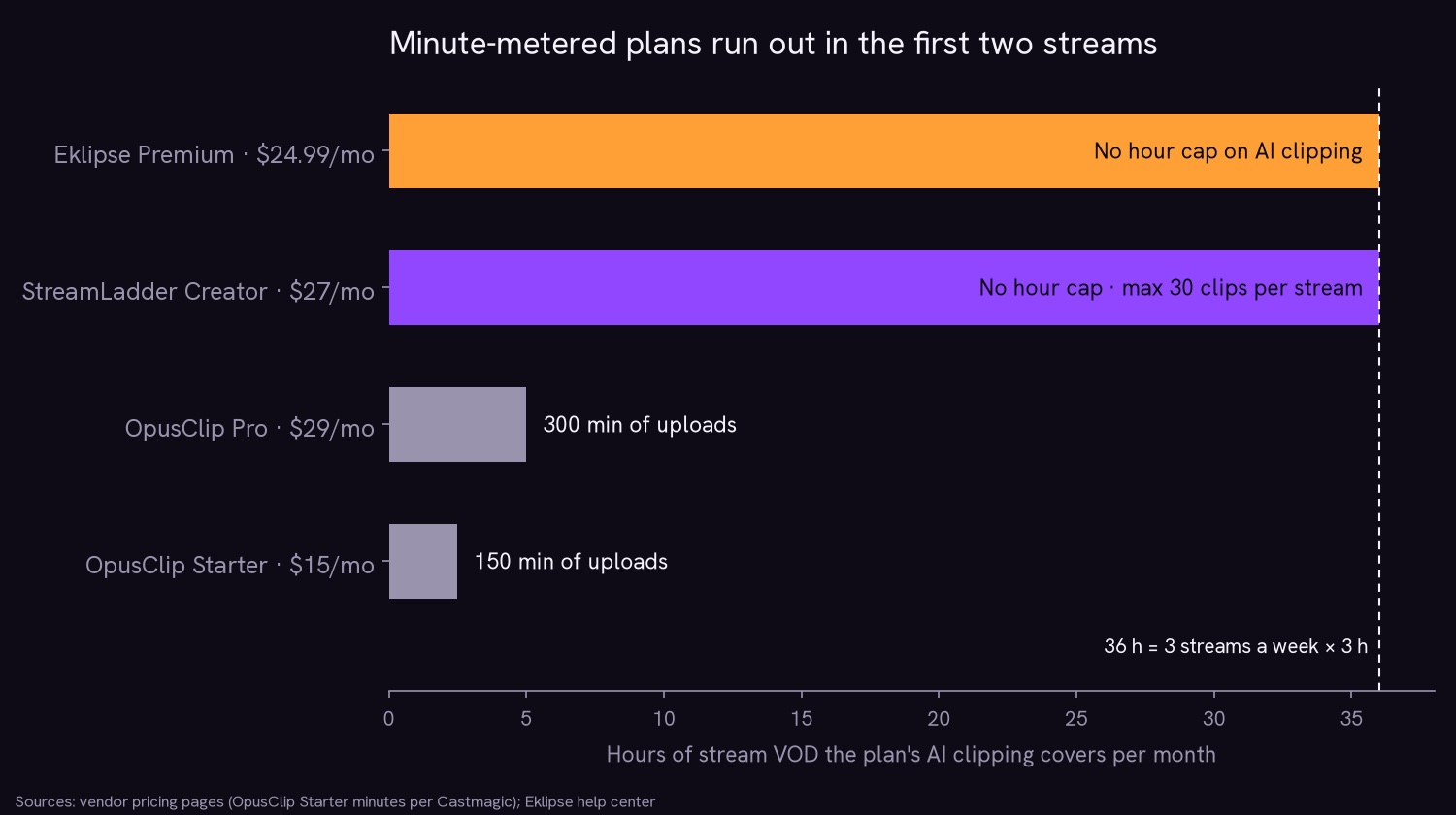
Flat plans don’t care. At 36 VOD hours, Eklipse monthly works out to $0.69 per VOD hour. Eklipse annual drops that to $0.42.
StreamLadder Creator monthly lands at $0.75 per VOD hour. The more you stream, the lower that number goes.
Here’s the rule that falls out of it. If your VOD hours are low and your uploads are short, a metered plan can be cheaper. If you stream on a real schedule, a flat plan wins because your cost stops scaling with your output.
One honest note: OpusClip’s free tier gives you 60 credits a month, which is a real way to test whether AI clipping fits your workflow before you pay anyone. Use it.
If you want to see what a flat plan actually produces before spending anything, you can connect your channel and preview the clips the AI finds. Signing up is free, and the AI scans a recent stream so you can watch the output before you decide.
Is Eklipse worth it next to OpusClip and StreamLadder?
| Plan | Price | AI clipping | Billing unit | Covers a 36-hour month? |
|---|---|---|---|---|
| Eklipse Premium | $24.99/mo or $179.99/yr | Yes, unlimited | Flat month | Yes |
| StreamLadder Creator | $27/mo | Yes, up to 30 clips per stream | Flat month | Yes |
| StreamLadder Starter | $15/mo | No (editing only) | Flat month | No AI |
| OpusClip Pro | $29/mo | Yes | 300 credits (minutes) | No, 5 hours |
| OpusClip Starter | $15/mo | Yes | 150 minutes | No, 2.5 hours |
| Medal Premium | Not listed publicly | Not listed on Premium page | Subscription | Different job |
Read the table by column, not by price. The cheapest AI tier on the board is OpusClip Starter at $15, and it covers 2.5 hours of VOD. The priciest AI tier in the table, OpusClip Pro at $29, covers 5. Eklipse at $24.99 and StreamLadder Creator at $27 cover the whole month.
If you want the deeper feature-by-feature breakdowns, there are full comparisons of Eklipse vs StreamLadder and Eklipse vs OpusClip.
Where the cheap tier is the wrong tier
The $15 tier is the trap for beginners, and it isn’t always the same trap.
StreamLadder Starter at $15/month gives you editing and scheduling but no AI clipping, per its plans page. You still have to find your own highlights.
The AI feature, ClipGPT, starts at the $27 Creator tier. So if your whole reason for subscribing is “I don’t want to scrub through a 3-hour VOD at 1am,” the $15 plan doesn’t solve your problem. It solves a different one.
OpusClip Starter at $15/month does include AI clipping, but 150 minutes of upload is 2.5 hours. One long stream eats it.
Medal is a different category entirely. It’s a capture app that its Premium page calls free for clipping and editing, and Premium lists removable watermarks, unlimited upload length, original-quality uploads, and auto subtitles. The free tier caps uploads at 20 minutes.
Those are capture and upload perks. The page doesn’t list AI highlight detection on a finished VOD, which is the job Eklipse and OpusClip are sold for. Medal also doesn’t publish its Premium price on that page, so check it yourself before budgeting.
Where competitors genuinely win: StreamLadder Pro at $39/month does 4K 60fps, which is more than Eklipse Premium’s 1080p 60fps ceiling. If you need 4K exports, that’s your plan. OpusClip’s free 60 credits are the best no-cost way to test AI clipping on short uploads.
Monthly, six-month, or annual: when to commit
Eklipse Premium has three billing options. Monthly is $24.99. Six months is $112.99, which works out to about $18.83/month.
Annual is $179.99, which is about $14.99/month and saves $119.89 over a year compared to paying monthly. The mobile app runs $27.99/month.
The rule is simple. Run monthly until you’ve streamed 4 straight weeks without skipping a night. That proves the habit is real. Once it is, annual is the cheapest way to keep unlimited clipping running, and the $119.89 saved is nearly five months of monthly fees.
Do not buy annual on week one. A lot of new streamers stream hard for two weeks and then vanish for a month. Monthly costs you $24.99 to find out which one you are. Annual costs $179.99 to find out the same thing.
Prices change, and older third-party reviews don’t always keep up. The current numbers live on the Eklipse Premium pricing page, so check there before you pay.
When Eklipse isn’t worth it yet
Skip it if you stream under about 5 hours a month, which is one or two streams. At that volume, a metered plan’s free tier or a manual clip or two will cover you, and you’ve not built enough VOD to justify a monthly bill.
Skip it if you won’t post the clips. A subscription that produces 40 clips you never upload is a donation. The value comes from posting consistently to TikTok, Reels, and Shorts, not from owning a folder of unused files.
Skip it if you’ve not tested the output. Eklipse has no free plan, but signing up is free and the AI scans a recent stream so you can preview clips before paying. That free preview exists so you can judge clip quality on your own content instead of trusting a landing page.
If you stream on Kick, the same logic applies, and there is a dedicated breakdown of Kick highlight clipping if that’s your platform. The AI highlights feature page covers how the detection works across Twitch, Kick, and YouTube VODs.
Frequently asked questions
Is Eklipse worth it for a small streamer?
Yes, if you stream more than 5 hours a month and post the clips. Below that, free tiers and manual clipping cover you. The subscription pays off when it replaces hours of VOD scrubbing you would otherwise do yourself every week.
Is Eklipse worth it compared to free clipping tools?
Eklipse is worth it if you want unlimited AI clipping on a flat monthly price. OpusClip’s free tier stops at 60 minutes a month, and Medal’s free uploads stop at 20 minutes per clip. Eklipse has no free plan, but signing up is free and you get a free preview of AI-detected clips before paying.
How much does an AI clipping tool cost per month?
AI clipping plans run from $15 to $39 a month. OpusClip Starter is $15, StreamLadder Creator is $27, OpusClip Pro is $29, and StreamLadder Pro is $39. Eklipse Premium is $24.99 monthly or $179.99 yearly, which is about $14.99 a month.
OpusClip vs StreamLadder price: which is cheaper?
OpusClip Starter at $15 is cheaper than StreamLadder Creator at $27, but OpusClip bills by uploaded minutes while StreamLadder Creator bills a flat month. StreamLadder’s $15 Starter tier has no AI clipping, so the real AI comparison is $27 flat against $15 for 150 minutes.
Does Eklipse have a free plan?
No. Eklipse has no free plan. Signing up is free, and the AI scans a recent stream so you can preview clips before you pay. Premium starts at $24.99/month, or $179.99/year at about $14.99/month.
The bottom line
Eklipse is worth it when your VOD hours are high enough that manual clipping becomes a second job. For a beginner streaming 36 hours a month, flat plans win: Eklipse at $0.69 per VOD hour monthly or $0.42 annually, StreamLadder Creator at $0.75. Metered plans like OpusClip cover 2.5 to 5 hours, which is one or two streams.
Start monthly. Stream 4 straight weeks. Then commit to annual and keep the $119.89. And check the vendor page for current pricing before you pay.
Ready to see the clips before you spend anything? Sign up free and preview what the AI finds in your last stream.
🎮 Play. Clip. Share.
You don’t need to be a streamer to create amazing gaming clips.
Let Eklipse AI auto-detect your best moments and turn them into epic highlights!
Limited free clips available. Don't miss out!