How to Clip GTA 6 Streams into Shorts, Reels and TikToks
Connect your Twitch, Kick or YouTube channel to Eklipse, and its AI scans the GTA 6 VOD for high-signal moments like kills, reactions and chat hype peaks. It cuts those moments into clips and reframes them to 9:16, then you add captions and a look before posting to TikTok, Reels and Shorts. No manual scrubbing through a six-hour session.
Key Takeaways
– Eklipse auto-detects GTA 6 highlights from your VOD, so you skip the timeline hunt and go straight to editing.
– A 6-hour GTA session fits Premium’s 6h per-stream limit. A 10-hour launch marathon needs Premium Pro’s 12h limit.
– Use Bottom Split when your facecam reaction is the joke, and Full Screen when the gameplay itself is the punchline.
– All three platforms take 9:16 at 1080×1920. Shorts and Reels cap at 3 minutes; TikTok allows longer uploads.
If you just want to reframe one Twitch clip to 9:16 without an account, the free browser GTA 6 clipping tool handles that one-off. For a full stream VOD with dozens of moments, use the workflow below.
What you need before you clip GTA 6 streams
You need three things: an Eklipse account, a connected streaming channel, and a paid plan that matches your session length. Account creation is free. AI clip generation runs on a paid plan, either Premium or Premium Pro.
The quota math matters more for GTA 6 than for most games. Sessions run long. Heists, chases and RP scenes stack up, and a launch marathon can hit double digits in hours. Premium covers 2 streams per day up to 6 hours each, so a normal 6-hour GTA session fits. Premium Pro covers 5 streams per day up to 12 hours, which is what a 10-hour marathon needs.
| Feature | Premium | Premium Pro |
|---|---|---|
| Stream length | Up to 6h per stream | Up to 12h per stream |
| Streams per day | 2 | 5 |
| Export quality | 1080p | 2K |
| Storage | 30 days | 90 days |
| Publishing Autopilot | No | Yes |
Premium is $24.99/mo or $179.99/yr (about $15/mo). Premium Pro is $39.99/mo or $299.99/yr. Storage is the quiet factor. A month of daily GTA 6 streams piles up VODs fast, and Premium storage lasts 30 days. If you plan to mine old sessions later, the 90-day window on Pro gives you more room.
Ready to set up your channel? Create your Eklipse account and connect Twitch, Kick or YouTube.
Step 1: Let the AI find your GTA 6 highlights
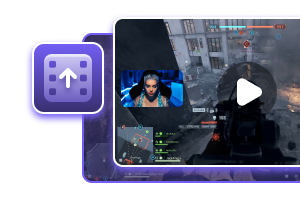
Import the VOD and let the AI do the first pass. Eklipse scans the stream for high-signal moments, things like kills, big reactions, and chat or hype peaks, then auto-generates clips from them. You’re not dragging a playhead across six hours looking for the good part.
GTA 6 works in your favor here. The game is built on loud moments: a police chase that ends off a bridge, a heist payoff that goes sideways, an NPC saying something unhinged while chat loses it. Those are the spikes the AI highlights feature is built to catch.
You can also mark moments live. The voice command feature lets you say a “Clip that” style command during the stream to flag a moment. That helps when something funny happens quietly and the AI might miss it. Say the command, keep playing, and sort it out after the stream.
One tip for long sessions: import the VOD the same day you stream it. The sooner clips exist, the sooner you can post them while the moment is still fresh for your audience.
Step 2: Reframe each clip to 9:16
Every clip needs to become vertical. Eklipse auto-formats to 9:16 for TikTok, Reels and Shorts, and facecam detection and crop happen automatically. You can still trim the start and end so the clip opens on the action instead of three seconds of you breathing.
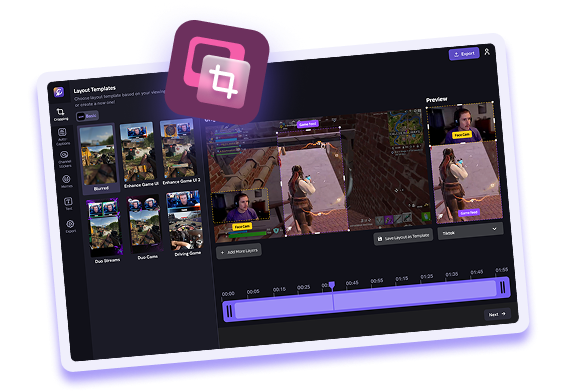
The AI Edit flow has two steps. Step 1 is Layout, with options like Full Screen, Bottom Split and Blurred. Use “Adjust crop” if the frame lands wrong. Step 2 is style.
Which layout to pick depends on what the joke is:
- Bottom Split when your facecam reaction is the point. A crash you didn’t see coming, a heist fail, an NPC that startles you. The viewer needs your face and the gameplay at the same time.
- Full Screen when the gameplay is the point. A clean chase, a perfect drift, a cinematic moment that speaks for itself.
- Blurred when the source is wide and you want the full frame visible without hard cropping the sides.
GTA 6 clips tend to be reaction-driven, so Bottom Split will probably be your default. Switch to Full Screen for the moments where the game looks good enough to carry the clip alone.
Step 3: Add captions and a look
Open a generated clip in the mobile app and tap “Choose Editing Style.” Swipe through the auto-applied looks until one fits, then hit Export Clip or Publish. That’s the whole loop for a quick post.
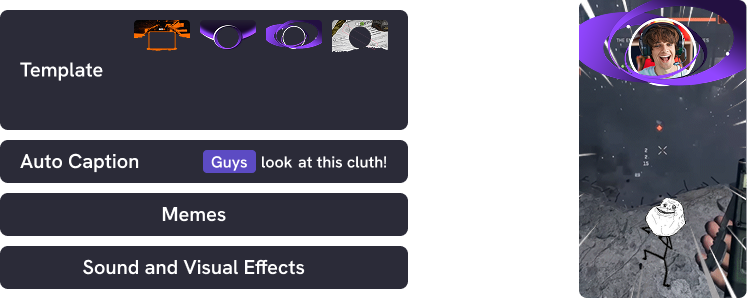
Captions matter for short-form. Many people scroll with sound off, and a GTA 6 clip with no text loses the punchline. Eklipse adds auto-captions, and English is the optimized language. Check them anyway, especially on names and in-game slang.
Templates and a channel sticker (your name, a color, platform icons) keep your clips recognizable in a feed. When someone scrolls past three gta 6 tiktok clips in a row, the sticker is what tells them the fourth one is yours.
A few caption habits that help:
- Keep the caption short. One line beats a paragraph.
- Put the funniest line near the top of the frame, not buried at the bottom.
- Skip captions on pure gameplay clips where the visual is the whole story.
If you’re still deciding which moments to chase, our GTA 6 content ideas guide breaks down the formats that work for this game.
Step 4: Post GTA 6 clips to TikTok, Reels and Shorts
Each platform takes 9:16 at 1080×1920, but the length limits differ. Here’s where things stand, based on Sprout Social’s video specs guide and Piktochart’s Shorts guide.
| Platform | Max length | Ratio |
|---|---|---|
| TikTok | 10 min recorded in app, 60 min uploaded | 9:16 |
| Instagram Reels | 3 min in-app | 9:16 |
| YouTube Shorts | 3 min | 9:16 |
Shorts used to stop at 60 seconds, so the old “keep it under a minute” rule no longer binds you. Still, a GTA 6 chase clip doesn’t need three minutes. Cut to the moment, land the payoff, end.
The Content Planner schedules and posts to TikTok, Instagram Reels and YouTube Shorts from one place. Queue a week of clips and let them go out on a schedule instead of posting one at a time.
Publishing Autopilot and Live Clipping are Premium Pro only. If you want clips to publish without you touching them, that’s the tier. On Premium, you schedule and post through the planner yourself.
Weekly Drop is worth knowing about too. It drafts a weekly per-game best-of montage from your qualifying clips. For GTA 6, that gives you a recap video of your best moments without building it by hand.
Want the full workflow with scheduling built in? Set up your Eklipse account and connect your channel.
FAQ
Can I clip GTA 6 streams without editing anything myself?
Mostly. Connect your channel, import the VOD, and Eklipse’s AI finds the high-signal moments and generates clips. You still pick a layout and a style, but you’re not scrubbing a timeline or cutting clips by hand.
What if I only have one Twitch clip I want to make vertical?
Use the free browser GTA 6 clipping tool. It reframes a single Twitch clip to 9:16 without an account. The full AI workflow is for whole VODs with many moments.
How long can a GTA 6 clip be on each platform?
Shorts and Reels both allow up to 3 minutes. TikTok allows up to 10 minutes recorded in the app and up to 60 minutes uploaded. All three use 9:16 at 1080×1920.
What about clipping GTA 6 on PS5 or Xbox?
That’s a different workflow: console capture, covered in our guide to clipping GTA 6 on PS5 and Xbox. If you stream from console, the Eklipse console feature handles the streaming side.
Start with one session
You don’t need a perfect system on day one. Stream GTA 6 like you normally would, import the VOD, and let the AI surface the moments. Pick the three clips that make you laugh, reframe them, caption them, and post.
The workflow gets faster each time. After a few sessions, you’ll know which layout fits which moment and which clips your audience actually watches. Create your Eklipse account and turn your next GTA 6 stream into a week of vertical clips.
🎮 Play. Clip. Share.
You don’t need to be a streamer to create amazing gaming clips.
Let Eklipse AI auto-detect your best moments and turn them into epic highlights!
Limited free clips available. Don't miss out!