Your GTA 6 stream, clipped
AI cuts Shorts, Reels and TikToks.
How to Clip Streams: A Guide for Streamers and Clippers
To clip a stream, hit the clip button on the player while the moment is live, or open the VOD and select the section you want. Twitch and YouTube clips run 5 to 60 seconds, and Kick clips are reported to go up to 180 seconds. That gives you a short native clip. Turning it into something you can post on TikTok, Reels or Shorts takes one more step.
Key Takeaways
– Twitch clips are 5 to 60 seconds, YouTube clips are 5 to 60 seconds, and Kick is reported to allow up to 180 seconds.
– Twitch now makes a portrait version of each clip automatically, but Kick and YouTube clips still need a 9:16 reframe, and none of them pick the moments for you.
– Streamers can connect Twitch, Kick or YouTube to Eklipse AI clipping and let AI find the kills, reactions and chat hype peaks in a VOD.
– Clippers should get permission from the creator first, and one Eklipse account can clip other creators’ channels too.
How to clip streams on Twitch, Kick and YouTube
Every platform has a clip button on the player. The difference is how long the clip can run and where you trim it.
| Platform | Clip length | Where the button is | Source |
|---|---|---|---|
| Twitch | 5 to 60 seconds | Clip button on the player, then trim in the Clip Creator | Twitch developer docs |
| Kick | Reported up to 180 seconds | Clip button on the player | win.gg report |
| YouTube | 5 to 60 seconds | Clips feature on live streams and videos | YouTube Help |
On Twitch, both viewers and the streamer can clip. You press the clip button, the last stretch of the stream gets saved, and you trim the edges in the Clip Creator. Streamers can also add a “Clip That” Quick Action in Stream Manager to clip their own stream live, and Twitch creates a portrait version of every clip that you adjust in the Clips Manager (Twitch blog, OneStream guide). Kick works the same way with its own clip button. Kick raised its clip limit from 60 to 180 seconds according to a report citing a Kick social post, so treat that number as reported rather than confirmed.
YouTube is a little different. The Clips feature works on live streams and on uploaded videos, and you pick a 5 to 60 second selection. That makes it handy for pulling a moment from a VOD after the stream ends.
Why native clips still need work for TikTok, Shorts and Reels
A native clip is built for the platform it came from. Kick and YouTube clips keep the stream’s landscape frame. Twitch’s automatic portrait version helps, but you still adjust its layout clip by clip, and someone still has to press the clip button at the right moment.
TikTok, Reels and Shorts are 9:16. Drop a 16:9 clip into them and you get black bars, a tiny subject, or a crop that cuts off the facecam. Native caption support also varies by platform and clip type, so check each clip before you post.
The bigger cost is finding the moments. Someone has to watch the stream or the VOD and press clip at the right second, then fix the frame. Across a 6-hour stream that adds up fast, which is why a lot of streamers and clippers hand the search to AI.
Want to skip the VOD hunt? Set up an Eklipse account and connect your channel.
How to clip your own streams with AI
If you stream, the fastest path is to let AI scan the VOD for you. Connect Twitch, Kick or YouTube to Eklipse, and the AI highlights feature scans the stream for high-signal moments: kills, reactions and chat hype peaks.
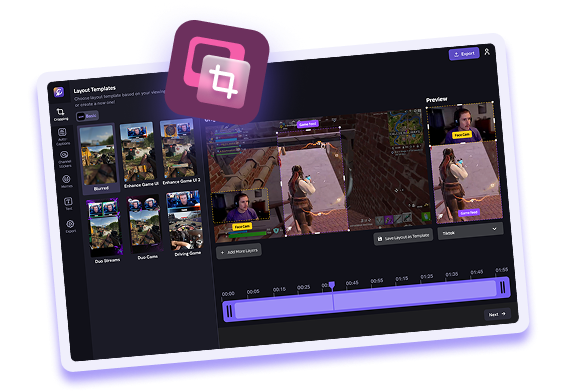
Nobody has to press clip live. From there, Eklipse auto-generates clips from the whole VOD and applies a vertical layout. You can pick Full Screen, Bottom Split or Blurred depending on what fits the moment. Then the Content Planner schedules the clips to TikTok, Reels and Shorts so you’re not posting one by one.
Plan math matters here. Premium is $24.99/mo or $179.99/yr and covers 2 streams per day up to 6 hours each, up to 30 clips per hour, 1080p, and 30-day storage. A 6-hour stream fits Premium. If you stream longer than that, or you want 2K and 90-day storage, Premium Pro is $39.99/mo or $299.99/yr with 5 streams per day up to 12 hours and Publishing Autopilot.
Signing up for an account is free. AI clip generation needs a paid plan, either Premium or Premium Pro.
For a full walkthrough with one game, see this guide on clipping GTA 6 streams for Shorts, Reels and TikTok.
How stream clippers clip other creators
Clippers pull moments from someone else’s stream and post them. The first rule is simple: get permission from the creator before you post their content. Many creators run clip programs, so ask, read the rules, and follow them.
Picking moments is the skill. Look for the peak, not the setup. A clean kill, a big reaction, a chat explosion. Those are the frames that hold attention in a vertical feed.
One Eklipse account can clip other creators’ channels too, which is what makes it useful for clippers. You add the channel, let AI scan the VOD, and get clips back from the whole stream, across Twitch, Kick and YouTube. You can choose a layout that keeps the facecam and gameplay crop readable.
The Content Planner also helps you spread clips out instead of dumping them all at once. If you’re new to this side of things, this guide on how to start clipping GTA 6 for money covers clip campaigns and how they pay.
Clipping for several creators? Create an Eklipse account and add the channels you clip.
What makes a stream clip worth posting
Open on the action. Skip the walk-up. If the kill or reaction happens at second eight, start near second six.
Keep one moment per clip. A clip that tries to show three things usually shows none of them well. Pick the best beat and cut around it.
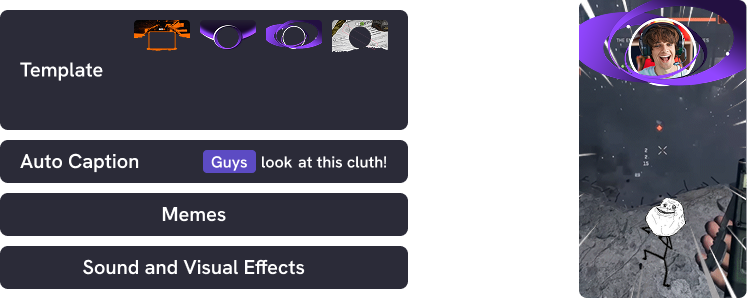
Add captions. Captions keep the clip readable for anyone watching muted. Eklipse can add them in the editor, along with effects.
Stay under platform caps. Shorts, Reels and TikTok all have length limits, and a tight clip beats a long one anyway. To test the reframe on a single clip, the GTA clips tool turns one Twitch clip into 9:16 with no account needed.
FAQ
How long can a Twitch clip be?
Twitch clips run 5 to 60 seconds, per Twitch’s developer docs. You clip with the button on the player, then trim in the Clip Creator.
Can I clip someone else’s stream?
Yes, but get permission from the creator first. Many creators run clip programs with their own rules, so check before you post. One Eklipse account can clip other creators’ channels too.
Why do my clips look bad on TikTok and Reels?
Kick and YouTube clips keep the landscape stream frame, while TikTok, Reels and Shorts want 9:16. Reframe the clip (or adjust Twitch’s portrait version), check the captions, and then post.
Is Eklipse free to use?
Creating an account is free. AI clip generation needs a paid plan, either Premium or Premium Pro.
Start clipping
Clipping a stream is quick. Making that clip ready for vertical platforms is the part that takes work, and that’s where AI clipping saves time. Connect your channel, let the AI find the moments, and schedule the clips. Create your Eklipse account and pull your first VOD in.
🎮 Play. Clip. Share.
You don’t need to be a streamer to create amazing gaming clips.
Let Eklipse AI auto-detect your best moments and turn them into epic highlights!
Limited free clips available. Don't miss out!