
TL;DR:
Q: How to create a highlight reel?
A: The most efficient way is to use an AI-powered tool like Eklipse.gg. It automatically scans your VODs, detects the best moments, and compiles them into shareable clips, saving you hours of manual scrubbing and editing.
Learning how to create a highlight reel is essential for channel growth, but the traditional process is a massive time sink. Usually, it involves downloading massive VOD files, scrubbing through hours of footage to find killstreaks or funny moments, and manually editing them together. For most streamers, this manual workflow is the biggest bottleneck to consistency.
But what if you could reclaim that time? Imagine saving 10+ hours of editing work every single week. That is time you could spend streaming, engaging with your Discord community, or simply getting some well-deserved rest. In 2026, you don’t need to be a video editing wizard to go viral; you just need the right assistant. Let’s explore how to automate your highlights and turn hours of work into minutes of review.
Why “Grinding” the Edit is Hurting Your Stream
There is a common misconception in the streaming community that you have to do everything yourself to “earn” your success. While hard work is necessary, busy work is not. If you stream for 4 hours, spending another 4 hours editing a highlight reel is a recipe for burnout.
Your value as a creator lies in your personality and your gameplay, not in how fast you can use the razor tool in Premiere Pro. By automating the creation of your highlight reels, you shift your focus from production to performance. This is the “Outcome” mindset: the goal isn’t just to have a video; the goal is to have a growing channel without sacrificing your mental health.
The Smart Way: Using Eklipse as Your Personal Assistant
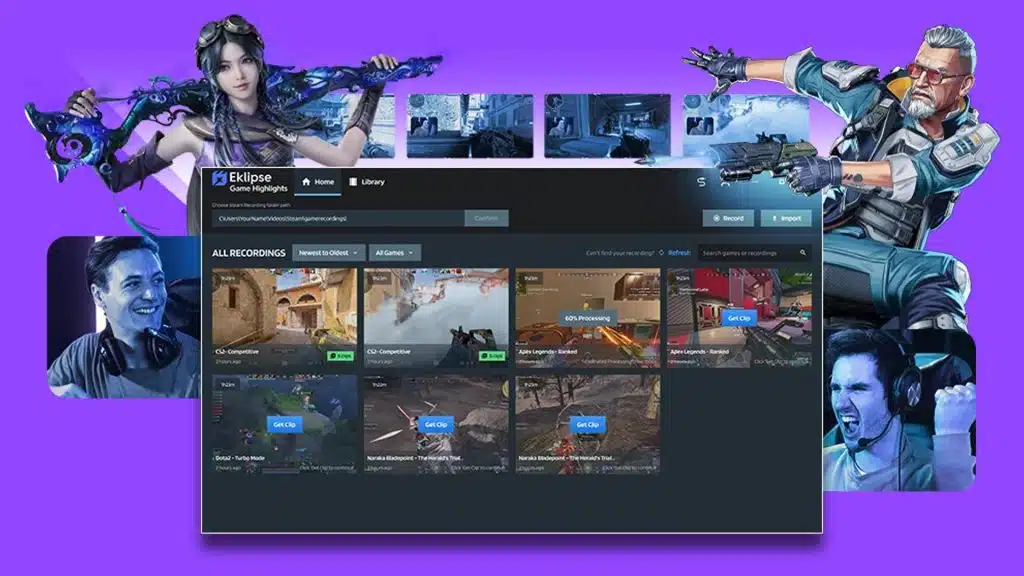
Think of Eklipse not just as a software tool, but as a dedicated production assistant that watches your stream 24/7. While you sleep, Eklipse processes your latest VODs from Twitch, YouTube, or Kick, identifies the high-energy moments, and prepares them for you.
Here is how Eklipse changes the workflow:
- Auto-Detection: No need to re-watch your 6-hour stream. Eklipse uses AI to find kills, wins, and funny moments automatically.
- Instant Formatting: It automatically converts landscape footage into vertical (9:16) formats perfect for TikTok, Shorts, and Reels.
- AI Captions: It generates accurate captions to keep viewers engaged, even with the sound off.
For those serious about quality, Eklipse Premium offers 1080p export quality, faster processing speeds, and the ability to process longer streams. It’s a small investment to reclaim hours of your life.
How to Create a Highlight Reel with Eklipse (Step-by-Step)
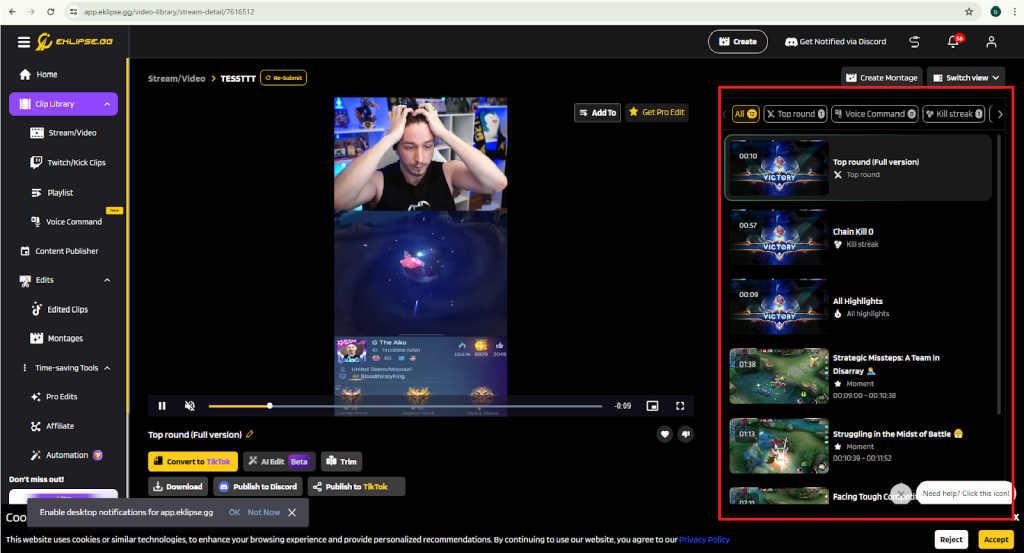
Ready to save those 10 hours? Here is the exact workflow to generate a highlight reel in minutes.
Step 1: Connect Your Stream
Log in to Eklipse.gg and link your Twitch, YouTube, or Kick account. You only need to do this once. Eklipse will automatically see your past VODs.
Step 2: Select Your Stream
Choose the stream you want to turn into a highlight reel. Click “Get Clips.” Eklipse’s AI will begin analyzing the footage. You can close the tab and walk away—go grab a coffee or start your next stream. The AI is doing the heavy lifting.
Step 3: Review and Refine
Once processed, you will see a list of generated clips ranked by potential virality.
- Review: Watch the clips Eklipse selected.
- Edit: Use the built-in editor to trim the start/end times, add stickers, or adjust the AI face-cam layout.
- Compile: You can download individual clips or stitch them together into a longer montage.
Step 4: Export and Share
Export your clips directly to TikTok, YouTube Shorts, or Instagram Reels. If you are a Premium user, you can utilize the Social Media Scheduler to plan your posts for the week, ensuring you stay consistent without logging in every day.
The Old Way: Manual Editing (For Comparison)
To truly appreciate the time you are saving, let’s look at what the manual process entails. If you choose not to use AI, here is how to create a highlight reel manually:
- Download the VOD: Wait for a 5GB+ file to download to your PC.
- Watch the Footage: Re-watch your entire stream (real-time or 2x speed) and write down timestamps of good moments.
- Import to Editor: Drag the file into DaVinci Resolve or Premiere.
- Cut and Trim: Manually cut out the boring parts.
- Resize for Vertical: Manually adjust the aspect ratio and keyframe your face cam to keep it in frame.
- Add Captions: Type out subtitles manually, word for word.
- Render: Wait for the video to export.
Total Time Estimated: 4 to 6 hours per video.
Total Time with Eklipse: 15 to 30 minutes.
3 Tips for Better Highlight Reels in 2026
Even with an AI assistant, your creative input matters. Here is how to ensure your highlights perform well:
- Keep it Short: Attention spans are shorter than ever. Aim for clips under 60 seconds for Shorts/Reels.
- Hook in 3 Seconds: Ensure the very first second of your highlight has action or a loud reaction. If it starts slow, people scroll.
- Use Eklipse Premium Features: High-definition quality matters. Viewers on 2026 devices expect crisp 1080p visuals. Upgrade to Premium to remove watermarks and ensure your content looks professional.
Frequently Asked Questions
How long does it take to create a highlight reel with AI?
With Eklipse, the active work time is usually 15-20 minutes. The AI processing happens in the background, so you don’t need to sit at your computer while it finds the clips.
Can I use Eklipse for Kick streams?
Yes! Eklipse supports Kick, Twitch, YouTube, and Facebook Gaming. You can also upload video files directly from your computer or Google Drive (a Premium feature).
Is the free version enough?
The free version is a great starting point, offering 720p exports and standard processing. However, if you want to save maximum time and get the highest quality (1080p) without watermarks, Eklipse Premium is the recommended choice for growing streamers.
Conclusion: Work Smarter, Stream More
Learning how to create a highlight reel doesn’t mean you have to suffer through hours of editing. By leveraging AI, you are buying back your time. That is 10+ hours a week you can reinvest into your community, your gameplay, or your personal life.
Don’t let editing fatigue stop you from growing. Let Eklipse handle the grind so you can focus on the game.
Ready to automate your content creation? Try Eklipse Premium today and see how much time you can save.
🎮 Play. Clip. Share.
You don’t need to be a streamer to create amazing gaming clips.
Let Eklipse AI auto-detect your best moments and turn them into epic highlights!
Limited free clips available. Don't miss out!
