
AI video editing: what it replaces and what it can’t
AI video editing removes two of the four layers of editing work and barely touches the other two. It eliminates the search for usable moments and it makes transcription, captions, and reformatting close to free. It does not decide where a clip should start, and it has no opinion on whether a clip is worth posting.
That split is the whole story, and almost nobody sells it honestly.
Every tool page you’ve read promises to “edit your videos with AI” as though editing were one job. It’s four, and knowing which two you still own is the difference between shipping 15 good clips a week and shipping 15 forgettable ones.
This guide breaks down each layer, what AI does to it, and where the work moves next.
Key takeaways
- →Editing splits into search, mechanical transform, assembly, and judgment; AI has effectively solved the first two.
- →The gain is throughput, not quality — nothing about the model makes any individual clip better than a good editor would.
- →Twitch now ships Auto Clips, captions, and a voice command natively, so the mechanical layer is becoming table stakes, not a differentiator.
- →Detection is genre-dependent: it works on games with discrete events and degrades on strategy and narrative content.
- →The bottleneck moved from labor to taste, and most creators haven’t noticed because the old bottleneck was so loud.
The four layers of video editing, and which two AI removes
Before AI, a creator turning a stream into short-form did four distinct jobs, usually without naming them.
Search meant scrubbing hours of footage to find the moments worth keeping. Mechanical transform meant transcription, captions, cropping to vertical, trimming silence, and levelling audio. Assembly meant choosing in-points and out-points and deciding how the beats land. Judgment meant knowing which clips deserved a post.
Search and mechanical transform are labor. Assembly and judgment are taste. AI turned out to be excellent at labor and useless at taste. The whole creator-tools market is still working out what that means.
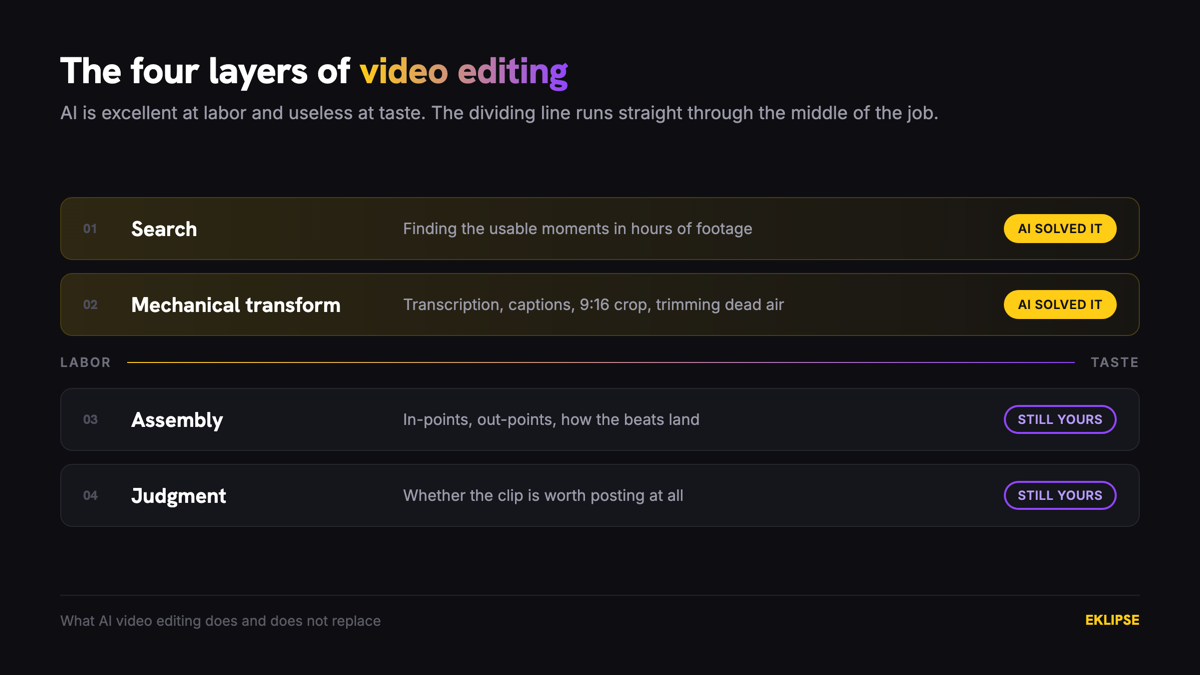
Here’s the split as it stands:
| Layer | What AI does to it | What’s left for you |
|---|---|---|
| Search | Effectively eliminated | Nothing |
| Mechanical transform | Effectively solved, near-zero cost per clip | Spot-checking accuracy |
| Assembly | Barely touched; models cut around events, not tension | All of it |
| Judgment | Not touched at all | All of it |
Read that table as a budget. The hours you used to spend on the top two rows are now available for the bottom two, and most creators spend them posting more instead.
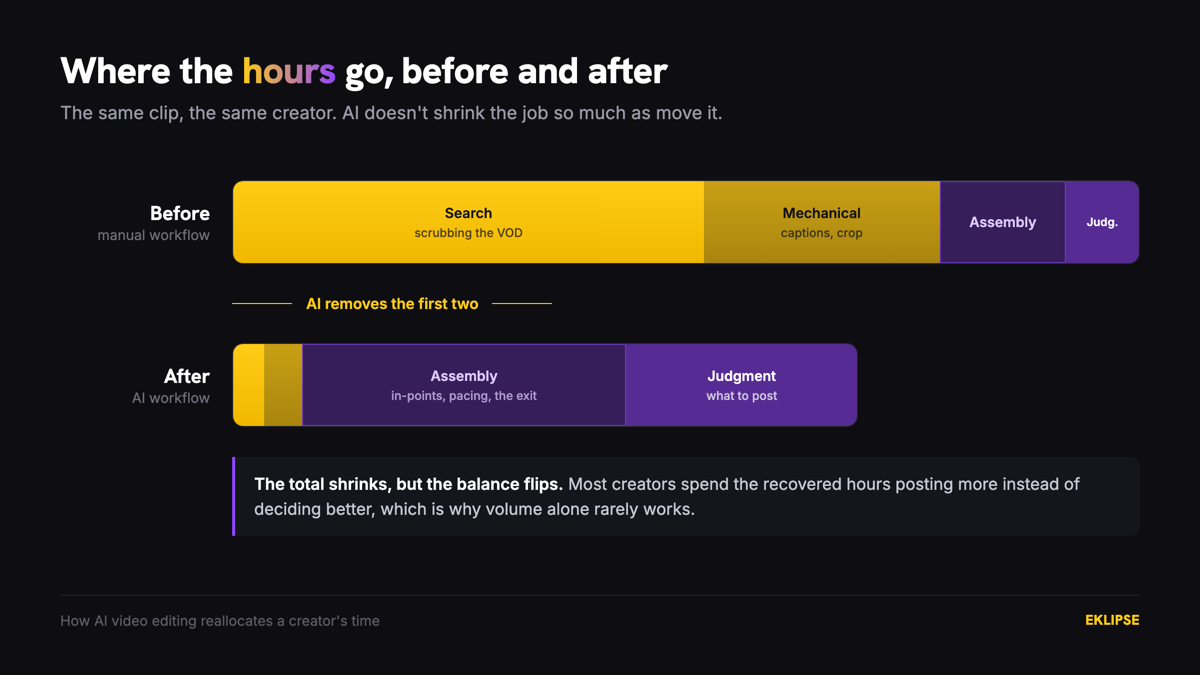
Layer one: AI video editing kills the search step
This is the large win and it’s genuinely large. Finding the usable 90 seconds inside a six-hour VOD was the single most expensive thing about being a streamer who also posts.
Detection models watch the whole recording for signals a human would have to sit through: kill feed entries, audio spikes, chat bursts, on-screen events. Automatic highlight detection scans a multi-hour VOD in roughly 15 to 20 minutes and returns a shortlist you review instead of a timeline you scrub.
The economics are stark. Manual search scales linearly with footage length, so a creator who streams more has strictly less time to post. Automated search is close to flat, which breaks that constraint entirely.
Sam streams around 20 hours a week and used to post twice. The posting rate wasn’t a discipline problem. Reviewing 20 hours to find six clips took longer than the streaming did, so most weeks the footage sat untouched until it felt stale enough to skip. Search was the only reason his output was two.
Layer two: the mechanical work is now near-free
Transcription is solved. Captions generated from that transcription are solved. Cropping 16:9 gameplay to 9:16 with subject tracking is solved. Trimming dead air and levelling audio are solved.
None of these were hard problems intellectually. They were just slow, and slow is exactly what machines fix. A caption pass that cost 20 minutes per clip now costs nothing per clip, which changes what you’re willing to make. Tools like Eklipse Studio bundle the whole layer into one pass over the shortlist.
Two things still need your eyes. Caption accuracy drops when background music runs louder than your voice, so check the transcript before you post rather than after. And auto-crop follows the wrong subject on split-attention footage, like a facecam reacting to something happening at the edge of frame.
Worth knowing: the mechanical layer is where nearly all “AI video editor” marketing lives. If a tool’s pitch is captions and cropping, you’re looking at a commodity, and the next section explains why that matters.
Layer three: assembly is where AI still guesses wrong
Here’s where the honest version diverges from the sales pitch.
Detection models are trained on discrete events, so they cut a window centered on the moment something happened. Short-form retention gets decided before that moment. YouTube reports “Viewed (vs swiped away)” for Shorts precisely because the stay-or-scroll decision lands in the opening frames, and TikTok’s creative guidance puts 90% of recall impact inside the first six seconds.
So the model hands you a clip that opens on a clutch resolving, when the thing that would have held the viewer is the four seconds before it, where three teammates died and you were left on 14 HP. There’s no kill feed entry for “the situation just got hard.” A model tuned on events cannot see the absence of one.
This is a structural limit, not a maturity problem. It’s also the highest-value work left on your plate, and we covered the fix in why repurposed clips get no views.
Layer four: judgment doesn’t transfer
No model knows whether your clip is funny. It knows whether your audio spiked.
Those two things overlap enough to find moments. They don’t overlap enough to pick between them. A model can tell you 15 things happened. It cannot tell you that four of them are the same joke, that one only lands for regulars, and that two are mechanically impressive but unreadable to anyone who doesn’t play the game.
This is why throughput without judgment makes accounts worse rather than better. Posting everything the model returns trains the recommendation system on your weakest output, and the weak posts drag the reach of the strong ones.
Nadia had the opposite problem from Sam. Her tool was returning around 12 clips a session and she was posting all 12, on the theory that volume was the point. Cutting to three per session and spending the recovered time on in-points meant the account posted a quarter as much, and every post had a reason to exist. The AI hadn’t gotten worse. She’d started doing the layer it was never doing.
Why AI video editing gains are commoditizing
If your tool’s advantage is layers one and two, that advantage has a short shelf life, because the platforms are absorbing both.
At TwitchCon Rotterdam, Twitch announced Auto Clips, which generates captioned clips from stream moments using chat activity, vocal inflection, and on-screen events. Twitch reports that 85% of streamers using it have a clip to share after each stream. Captions are rolling out on community clips with editable text, timing, and style, and they’re on by default for Auto Clips and the “Twitch Clip That” voice command. Portrait layout editing shipped too.
Read that list against the four layers. Twitch is absorbing exactly layers one and two, natively and free, for anyone streaming on Twitch.
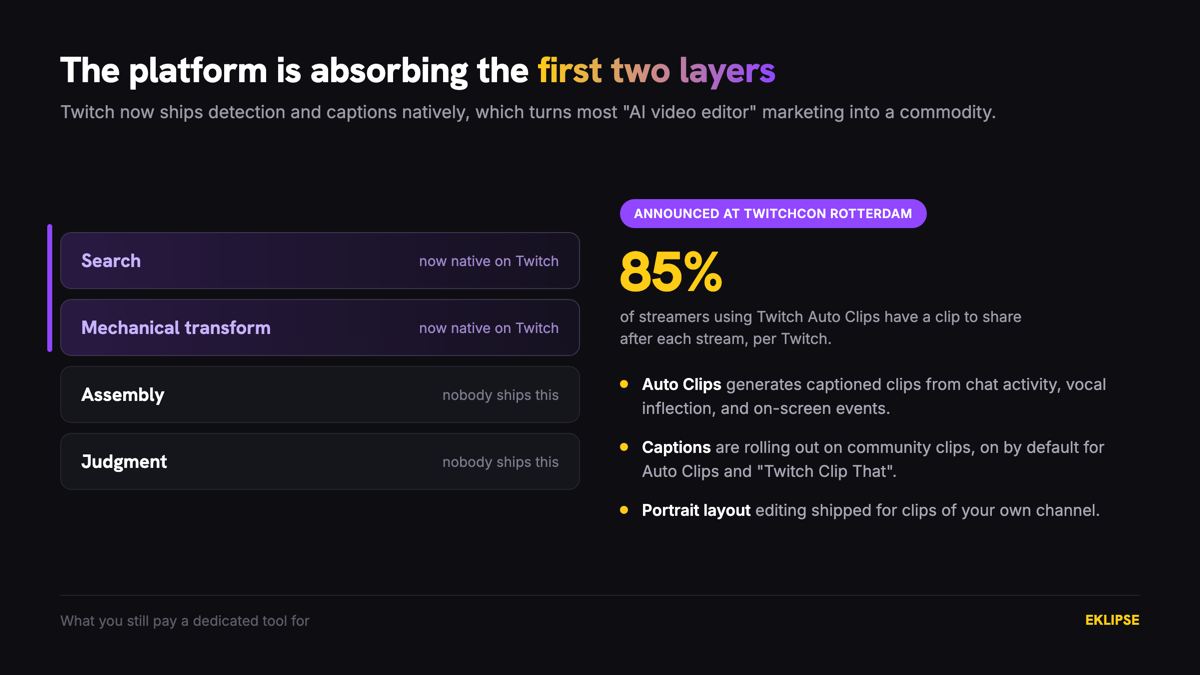
That’s not a reason to stop using dedicated tools. It’s a reason to be precise about what you’re paying for: multi-platform output, detection across a full VOD rather than a live session, deeper editing passes, and control over the assembly layer. Anything sold as captions-and-crop is about to be a platform feature.
Where AI video editing quietly fails: genre dependence
Detection accuracy varies more by game genre than any vendor admits. The pattern is predictable once you know what the model reads.
Event-based models perform well on FPS and battle royale titles, where kills, downs, and victories fire discrete, machine-readable signals. Accuracy degrades on strategy games, management sims, and narrative content, where tension builds over minutes and produces nothing that looks like a spike.
Talk-heavy content sits between the two. Newer detection covers Just Chatting, IRL, and podcast segments by reading emotional peaks and escalation rather than combat events, which puts a category back on the table that used to be written off entirely.
| Content type | Signal the model reads | What to expect |
|---|---|---|
| FPS and battle royale | Kill feed, downs, win screens | Strong. Spend your time on assembly |
| Sports and racing titles | Score changes, finish events | Strong on outcomes, weak on near-misses |
| Just Chatting, IRL, podcast | Vocal escalation, chat bursts, reaction peaks | Workable. Review more of the shortlist |
| MOBA and MMO | Kills and objectives, but slow context | Mixed. Teamfights land, macro plays don’t |
| Strategy, management, narrative | Almost nothing discrete | Weak. Budget for manual search |
The practical rule: if your game produces a visible kill feed or a win screen, expect strong detection and spend your time on assembly. If it doesn’t, expect to do more of the search yourself and budget accordingly.
Frequently asked questions
Can AI edit videos completely on its own?
No. AI reliably handles finding moments, transcribing, captioning, cropping to vertical, and trimming dead air. It does not choose where a clip should start, judge whether a moment is worth posting, or structure a sequence, and those are the parts that determine whether the clip performs.
Does AI video editing actually save time?
Yes, substantially, and it changes what the time is spent on. Manual search scales with footage length while automated search is close to flat, so a six-hour VOD costs about the same as a two-hour one. The hours recovered are best spent on in-points and curation rather than on posting more.
Is AI video editing good enough to replace a human editor?
For clip extraction and formatting, yes. For anything requiring narrative structure, comedic timing, or taste, no. Most creators don’t need an editor for the first category and can’t get the second from a tool at any price.
Why does the AI pick clips that aren’t interesting?
Because it’s detecting events, not evaluating them. An audio spike registers identically whether you were laughing or your dog knocked over a lamp. Treat the output as a shortlist to curate rather than a set of finished clips.
Will Twitch’s built-in tools make AI editors unnecessary?
For basic captioned clips from a live Twitch session, largely yes. Dedicated tools stay useful for full-VOD detection, multi-platform formatting, deeper editing control, and creators streaming on Kick or YouTube where Twitch’s features don’t apply.
What to do with the time AI gives back
AI video editing is a labor solution wearing a quality costume. It removes the search step and makes the mechanical work close to free. For anyone who streams more hours than they can review, that changes everything.
What it does not do is decide anything. Assembly and judgment stayed exactly where they were, and they’re now the only two layers where one creator can beat another.
So the practical move is unglamorous. Let the detection produce the shortlist, spend the recovered hours dragging in-points earlier and cutting the clips a stranger couldn’t follow, and stop treating output volume as the score.
If you want the shortlist waiting after your next session so the time goes into the edit instead of the search, connect your Twitch or Kick account and start clipping.
🎮 Play. Clip. Share.
You don’t need to be a streamer to create amazing gaming clips.
Let Eklipse AI auto-detect your best moments and turn them into epic highlights!
Limited free clips available. Don't miss out!