Viral gaming clips: why repurposed clips get no views
To make repurposed clips engaging, edit the two seconds before the play and the two seconds after it. AI highlight detection cuts around the peak of a moment, so the raw clip opens on an outcome the viewer has no reason to care about yet, and they swipe before the play lands.
Your clip is not losing because the play was bad. It’s losing because nobody found out what was at stake.
You already know this on some level. You’ve posted a 1v4 that you were proud of, watched it die at 340 views, and then watched a worse play from a smaller account pull 90,000. The footage was never the variable. The packaging was.
This guide covers what to change after the clips already exist: the opening frames, the captions, the context layer for non-players, the exit, and which clips from the batch deserve a post at all. It assumes you have already solved extraction. If you haven’t, start with automatic highlight detection and come back.
Key takeaways
– AI highlight detection timestamps the peak of a play, not the setup that makes the peak readable, which is why raw auto-clips underperform
– YouTube Studio reports “Viewed (vs swiped away)” for Shorts, and that decision happens in the opening frames, before your clutch resolves
– TikTok’s own creative guidance says 90% of recall impact lands in the first six seconds and recommends 5–10 words per second of on-screen text
– Most of your feed does not play your game, so the clip has to state the stakes visually rather than assume game knowledge
– Posting all 15 clips from a VOD trains the algorithm on your worst ones; post 3 and cut the rest
Two reasons your gaming clips get no views
There are exactly two failure modes, and the fix for one does nothing for the other. Diagnose before you edit.
Extraction failure means the clip contains the wrong footage. The AI grabbed a kill that was mechanically boring, or it cut a funny moment two seconds after the punchline. You’ll recognize this because when you rewatch the clip, you also feel nothing.
Packaging failure means the footage is genuinely good and the clip still dies. You rewatch it and think “this is a great play,” but the retention graph flatlines in the first second. This is the common case for streamers using auto-clipping, and it’s the one this article fixes.
Here is the test. Send the clip to someone who does not play your game and ask them to describe what happened. If they can’t, you have a packaging failure, regardless of how good the play was.
Most creators diagnose this wrong. They assume low views mean the AI picked badly, so they go back to scrubbing VODs manually, which costs hours and produces the same result. The AI picked fine. The clip’s just starting in the wrong place.
Want to see the footage on either side of what the detection handed you? Eklipse Studio shows the full clip with handles on either side of the detected moment, which is where the fixes below get applied.
The setup gap: why AI-cut clips start too late
Highlight detection models are trained on discrete events. A kill feed entry, an audio spike, a chat burst. The model finds the event and cuts a window around it, and that window is centered on the moment the event happened.
Short-form retention is decided before that. YouTube documents two Shorts metrics in Studio: “Shown in feed,” meaning how many times the Short surfaced, and “Viewed (vs swiped away)”, the percentage of those surfaces where the viewer stayed instead of scrolling. TikTok’s creative best practices put the same idea in numbers: 90% of recall impact is captured within the first six seconds.
So the swipe decision happens in a window that your clip spends showing an outcome with no stakes attached. The clutch resolves at 0:04. The viewer left at 0:01.
This is the gap. The AI found the peak. It didn’t find the setup, because the setup isn’t an event, it’s an absence of one. There is no kill feed entry for “three teammates just died and Marcus is alone in a building with 14 HP.” A model tuned on discrete events cannot see that, and it’s the only reason the peak means anything.
Which is why the single most valuable edit on any repurposed clip is dragging the in-point earlier.
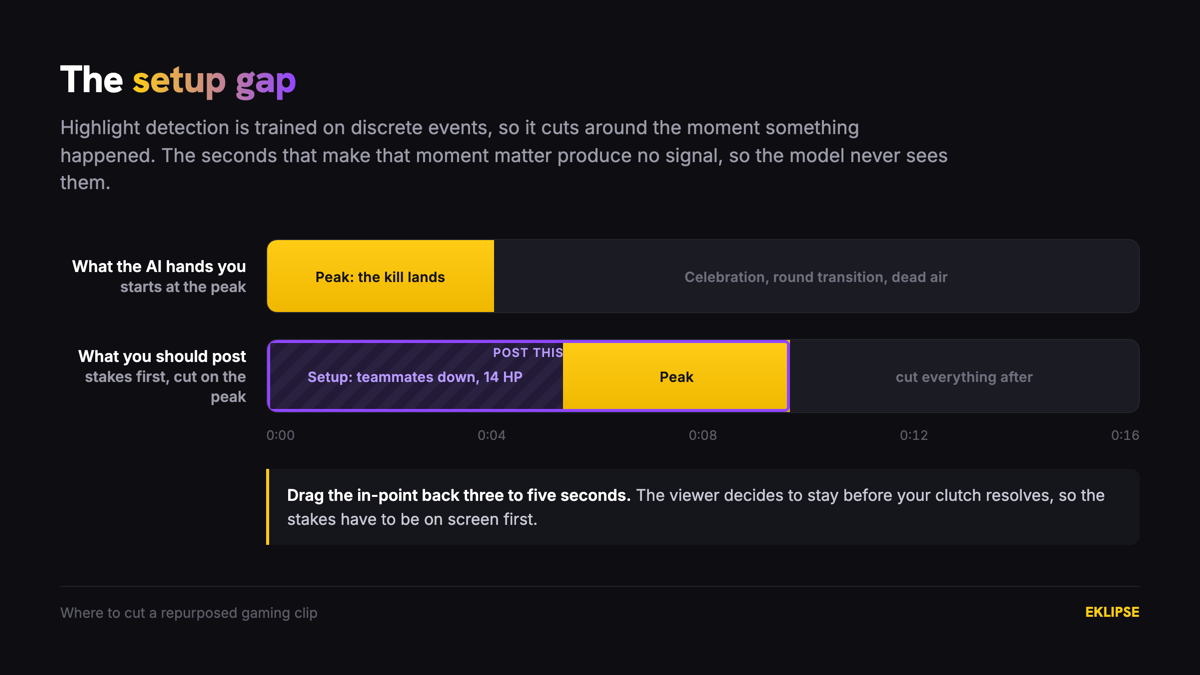
Marcus, a Valorant streamer, had a 1v4 retake sitting at 200 views. The auto-clip opened on him already peeking, first kill landing half a second in. He pulled the in-point back four seconds and now the clip opens on his last teammate going down and the spike already planted, with the round timer visible in the corner. Same play, same footage, one drag of a handle. The viewer who lands on it now has a reason to wait: they want to know if he makes it.
Rebuild the first two seconds of every gaming clip
Once you know the in-point is the problem, there are four patterns that work on gameplay footage. Pick per clip. Don’t apply the same one to every post, because a feed of identical openings reads as a template.
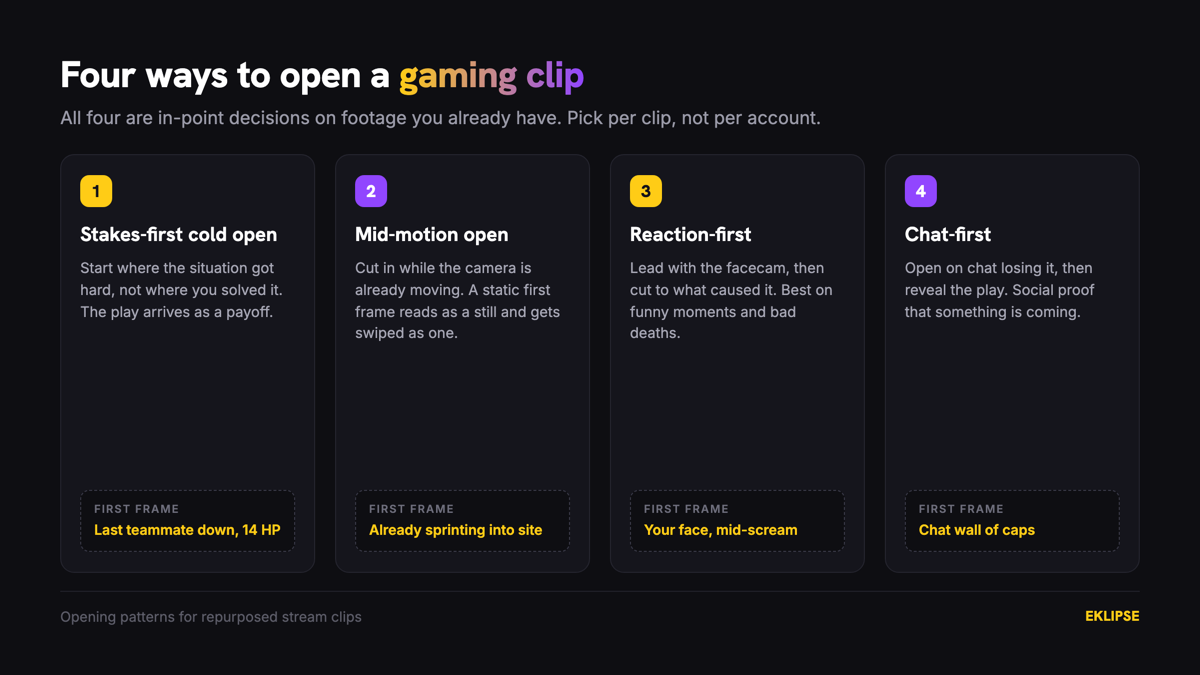
Stakes-first cold open. Start on the moment the situation becomes hard, not the moment you solve it. Last teammate down, low HP, final zone closing, one bullet left. The play then arrives as a payoff instead of a fact.
Mid-motion open. Cut in while the camera is already moving. A static opening frame reads as a still image for the first beat and gets swiped as one. Movement holds the eye long enough for the caption to land.
Reaction-first. Lead with your facecam reaction, then cut to the gameplay that caused it. This works well on funny moments and terrible deaths, where the emotion is the content and the mechanics are secondary.
Chat-first. Open on the chat losing it, then reveal the play. Chat reacting is social proof that something is about to be worth watching, and it works even for viewers who have never been in your stream.
None of these need a new recording. They’re all in-point decisions on footage you already have.
Captions are the cheapest fix for gaming clip retention
A large share of short-form gets watched with sound off, and gameplay audio is the part people mute first. Captions are not an accessibility afterthought on gaming clips, they are the layer carrying your comms, your reaction, and the joke.
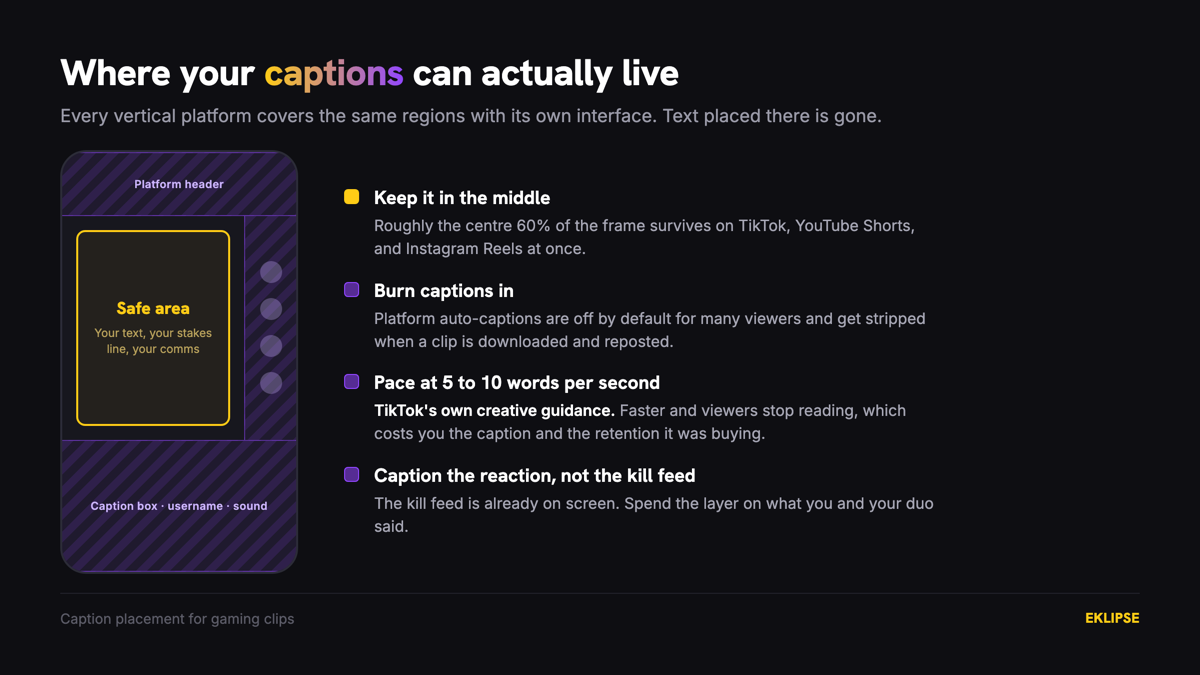
Four rules that matter more than caption style:
- Burn them in. Platform auto-captions are toggled off by default for many viewers and get stripped when a clip is downloaded and reposted. If the caption is not in the pixels, assume it isn’t there.
- Keep the pacing readable. TikTok’s guidance recommends 5–10 words per second for on-screen text. Faster than that and viewers stop reading entirely, which loses you the caption and the retention it was buying.
- Stay out of the platform UI. The bottom third of a vertical clip is covered by the caption box, username, and sound attribution on every platform. Anything you place there is gone.
- Caption the reaction, not the kill feed. The kill feed is already on screen. Transcribing it wastes the one layer you have. Caption what you said, what your duo said, and what was going through your head.
The twitch clip captions and kick captions queries both sit on page 1 of Google for Eklipse, which tells you how many streamers hit this wall. Eklipse ships auto-caption styles as part of the clip output, so the transcription step is handled and your job is the editorial one: deciding what to cut from the transcript so the screen is not a wall of text.
One caution. Auto-caption accuracy drops when background music is louder than your voice. If you run music hot on stream, check the caption pass before you post rather than after.
Make the play legible to people who don’t play your game
The FYP does not filter by game. Most people who see your Valorant clip have never loaded Valorant, and they are the reason a clip breaks out past your existing audience.
This is where repurposed clips fail hardest, because you edited them as a player. You know a Chamber TP out of a lost site is impressive. The viewer sees a man teleport for no stated reason.
The fix is one line of on-screen text placed in the opening two seconds, stating the constraint in plain English. Not “1v4 retake.” That’s jargon. “Everyone else is dead. He has 14 HP.” That’s a stake anyone can hold.
Priya streams Marvel Rivals to a few hundred concurrents and had been captioning her clips with the ultimate’s name. She swapped one clip’s opening text from “Luna Snow ult” to “if I miss this, we lose the round.” The gameplay was untouched. The difference is that the second version tells a non-player what to watch for, so there is a question open while the play runs.
Three things carry legibility on gameplay footage without needing text: a visible health bar at a dangerous number, a visible timer near zero, and a visible score that is close. If your clip has none of those on screen, the text line is doing all the work and it had better be good.
For game-specific packaging, the Valorant highlight clipper page covers which moments in tactical shooters read to outsiders and which ones only land for players.
Cut the clip before the celebration
Every streamer over-runs the ending. The ace lands, and then there are six seconds of you yelling, your duo yelling, and the round transition screen.
Cut on the peak or half a beat after. Dead air at the end of a short-form clip is what kills loops, and loops are the cheapest retention multiplier available, because a clip that loops cleanly counts a second view without earning a second impression.
Two practical cuts:
- End on the last meaningful frame. The kill, the reaction face, the chat exploding. Whichever is last, end there and not on the thing after it.
- Match the ending to the opening. If you opened mid-motion, end mid-motion. The loop becomes invisible and viewers watch two or three times without noticing.
Length follows from this rather than from a target. If the setup needs four seconds to establish stakes and the play takes six, the clip is ten seconds. Don’t pad it to hit a number, and don’t compress the setup to hit one either.
What separates a viral gaming clip from one that just looks good
A VOD run gives you 10 to 20 clips. Posting all of them is the most common mistake in this workflow, and it’s worse than posting nothing, because the weak ones teach the recommendation system what your account is.
Curate to three per session using two questions:
- Can a non-player tell what happened without you explaining it?
- Is there a question open in the first two seconds that the clip answers?
A clip that fails both is a clip for your Discord, not for TikTok. Send it to the people who already care.
Deni runs a Kick channel and was posting every clip Eklipse returned, roughly 12 a day. He cut to three, spent the recovered time rebuilding in-points and writing one opening text line per clip, and stopped posting the mechanically clean kills that had no story attached. The account posts a quarter as much and every post now has a reason to exist.
Be honest about what does not repurpose. Strategy games and long-setup moments resist short-form because the tension builds over minutes and cannot be compressed into a hook. Inside jokes with your regulars land in your community and nowhere else. Eklipse’s newer detection covers Just Chatting, IRL, and podcast-style segments, so those are back on the table, but a 40-minute macro decision in a 4X game is not becoming a good Short no matter how you cut it.
Once the packaging is consistent, scheduling is the remaining bottleneck, and the content planner handles the posting cadence so the edit is the only thing you are spending attention on.
Frequently asked questions
Why do my Twitch clips get no views on TikTok?
Almost always because the clip starts at the moment the play resolves instead of the moment it became difficult. TikTok viewers decide within the first few seconds, and a clip that opens on an outcome gives them nothing to stay for. Drag the in-point back three to five seconds so the stakes are visible before the payoff.
How long should a gaming clip be for TikTok and YouTube Shorts?
Long enough to establish stakes and deliver the play, which is usually 8 to 20 seconds for a single moment. Don’t pad to reach 60 seconds for monetization thresholds, because completion rate matters more than duration on both platforms.
Do I need captions on gaming clips?
Yes, and burned in rather than platform-generated. A large share of short-form is watched muted, and gaming audio is the first thing viewers turn off. Caption your voice and your comms, skip the kill feed, and keep text out of the bottom third where the platform UI sits.
Why does the AI pick clips that aren’t interesting?
Detection models find discrete events like kills, audio spikes, and chat bursts. They can’t see the setup that made the event matter, because an absence of action produces no signal. The model’s doing its job by flagging where something happened, and the setup is the part you add back in the edit.
How many clips should I post per stream?
Three from a typical session, chosen for whether a non-player can follow them. Posting all 10 to 20 dilutes your account signal, and the weak posts drag the reach of the strong ones.
Does this apply to Kick and YouTube VODs too?
Yes. The setup gap is a property of event-based detection, not of a platform. Kick and YouTube VODs come back with the same peak-centered cuts, and the same in-point fix applies.
Start with the clips you already have
Viral gaming clips aren’t a footage problem for anyone who already streams. You have the moments. Five edits separate a clip that travels from one that dies inside your own audience, and none of them require new gameplay.
Work in this order on your next batch: drag the in-point back until the stakes are visible, write one plain-English line of opening text, burn in captions for your voice, cut the ending on the peak, and post only the clips a stranger could follow.
The extraction is already solved. Detection scans a multi-hour VOD and hands you the shortlist, which frees the time this edit needs. If you want that shortlist waiting for you after your next session, connect your Twitch or Kick account and start clipping.
🎮 Play. Clip. Share.
You don’t need to be a streamer to create amazing gaming clips.
Let Eklipse AI auto-detect your best moments and turn them into epic highlights!
Limited free clips available. Don't miss out!