When you upload a video on YouTube, you can add special words called “tags.” These tags help YouTube understand what your video is about. It’s like putting labels on your video so that when people search for something related, they can find your video easily. This article is all about these tags—what they are, why they matter, and how to use them effectively. We’ll also share some tips to help you use tags the right way and get more people to watch your videos. Let’s dive in and make your YouTube game strong!

What Are YouTube Tags?
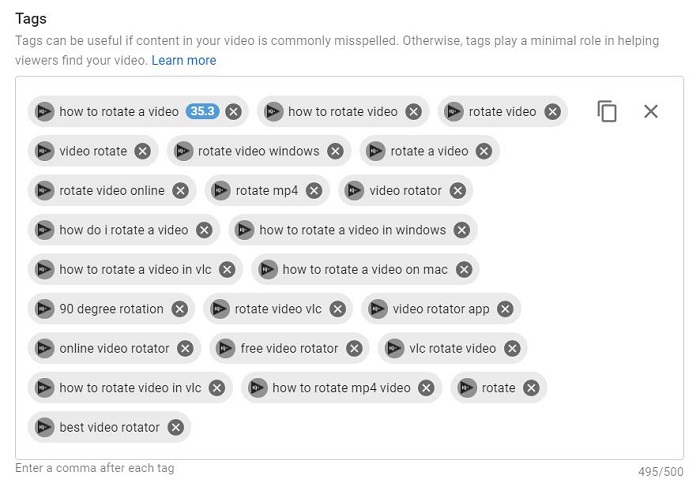
YouTube tags are keywords that you add to your YouTube videos. They help YouTube understand the content and context of your video, which allows YouTube to show your video in relevant search results. YouTube tags are important because they help people discover your videos in YouTube search results. YouTube is the second largest search engine in the world, and its 2 billion monthly active users use it to find videos on all sorts of topics. Tags for YouTube can be a great secondary method to boost discoverability on YouTube.
What’s The Difference Between YouTube Tags and Hashtags?
The main difference between YouTube tags and YouTube hashtags is that tags are used for relevancy in YouTube search, while hashtags are used for dedicated hashtag search. Tags will help YouTube’s search engine algorithm determine where to rank your video in YouTube search results. Hashtags will simply anchor your content to other content that uses an identical hashtag.
How to Add YouTube Tags to Your Video
To add tags to your YouTube videos, follow these steps.
- Go to YouTube and hover over your profile picture.
- Select YouTube Studio from the drop-down menu.
- Select Content from the left menu.
- Hover over the video you want to edit and click Details.
- Scroll down the video details page and click Show More.
- Add relevant tags, up to 500 characters in the Tags section.
- Click Save in the top-right corner of your screen when you’re done.
Before you start tagging your YouTube videos, spend some time researching popular YouTube tags. You can find popular tags by searching for a topic related to your content on YouTube. Choose a video that fits your search query and look at the YouTube tag suggestions on the right side of the screen. These tags are based on related searches and can show you what people who have watched this content were also interested in. You can also use a YouTube tags extractor or tags generator to find even more popular tags for YouTube.
To track the performance of your YouTube tags, use metrics such as views, watch time, engagement, and traffic sources. You can use YouTube analytics to track these metrics. YouTube search traffic sources let you see which search terms are bringing people to your videos. Continue to optimize your YouTube tags by analyzing your YouTube analytics and making adjustments to improve traffic.
Tips to Get the Most of Your YouTube Tags
- Don’t use too many tags. The YouTube algorithm is designed to present the most relevant content, so using too many tags or irrelevant tags may push your videos to the bottom of search results.
- Use tags that are trending. Use YouTube’s auto-suggest feature to identify trending tags.
- Use both specific and broad tags. Treat your tags like keywords for Google and use relevant and specific tags to make it easier for YouTube to match your videos with user searches.
- Don’t forget synonyms. Using synonyms can broaden the reach of your YouTube tags.
- Use competitor videos as inspiration. Check out how your competitors are tagging their YouTube videos and take note of their titles and descriptions.
Conclusion
YouTube tags are just one component of a successful YouTube marketing strategy. Now that you know all about YouTube tags, check out our complete guide on YouTube marketing to learn other strategies that will boost your brand’s YouTube presence.
Maximize your Black Ops 6 rewards—Create highlights from your best gameplay with with Eklipse
Eklipse help streamer improve their social media presence with AI highlights that clip your Twitch / Kick streams automatically & converts them to TikTok / Reels / Shorts